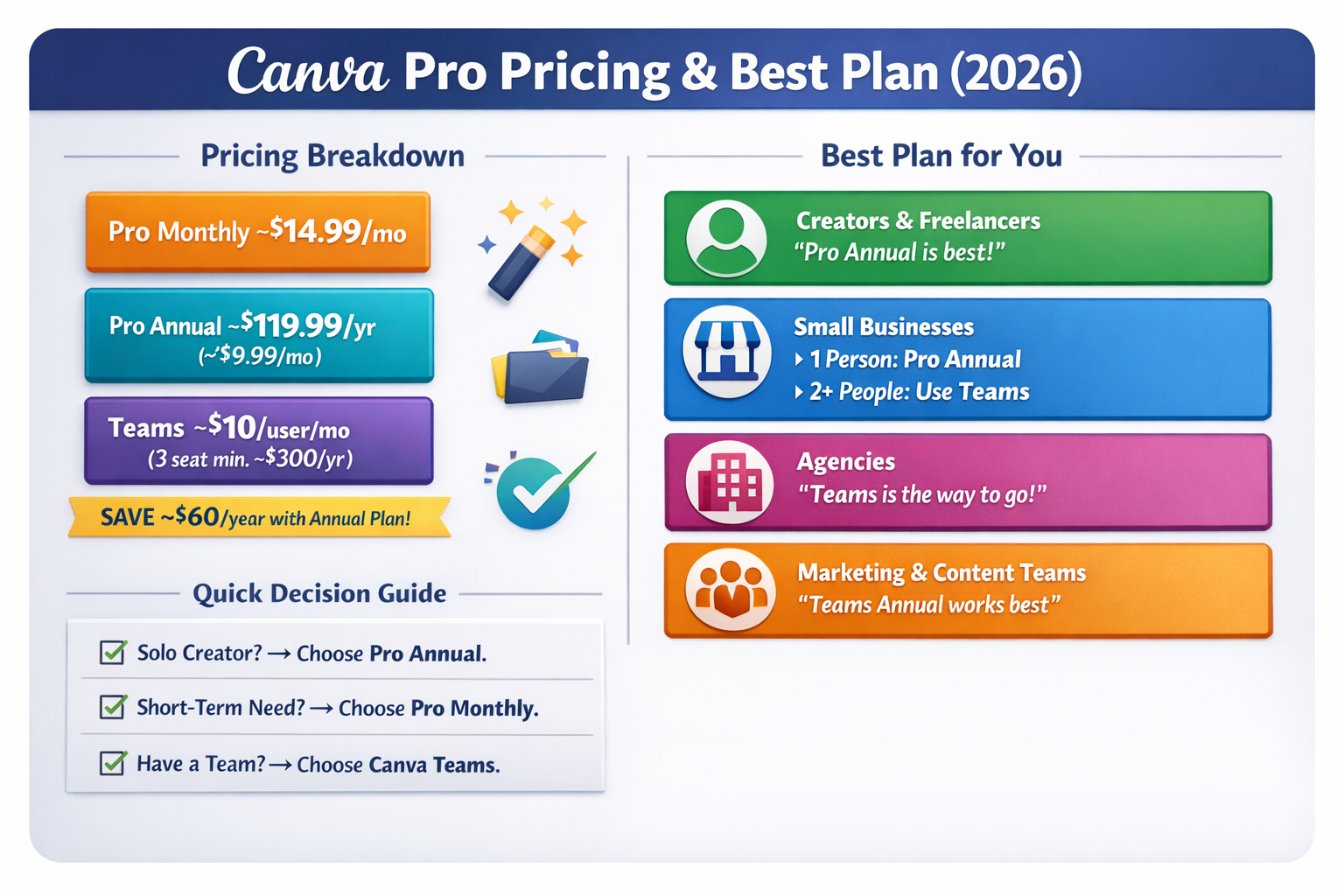
Canva has transformed the way people create designs, making professional-quality visuals accessible to everyone. In 2026, Canva Pro continues to be one of the most popular premium design subscriptions globally. However, before choosing a plan, understanding Canva Pro pricing, features, and long-term value is essential—especially if you rely on Canva for work, business, or content creation.
This guide explains Canva Pro pricing in 2026, compares monthly vs annual plans, and helps you decide which option offers the best value for your needs.
What Is Canva Pro?
Canva Pro is the premium version of Canva that unlocks advanced design tools, premium assets, and productivity features. While Canva Free is suitable for basic personal use, Canva Pro is designed for professionals who need speed, consistency, and commercial usage rights.
With Canva Pro, users gain access to:
-
Millions of premium stock photos, videos, and elements
-
Advanced editing tools like Background Remover and Magic Resize
-
Brand Kits for consistent branding
-
High-quality export options for print and digital use
Canva Pro Pricing in 2026
Canva Pro generally offers two main billing options:
1. Monthly Plan
The monthly Canva Pro plan is ideal for users who:
-
Need Canva Pro for a short project
-
Want to test premium features without long-term commitment
While flexible, the monthly plan is more expensive in the long run if used continuously throughout the year.
2. Annual Plan
The annual Canva Pro plan offers the best overall value. By paying upfront, users typically save around 40–45% compared to monthly billing.
This plan is best for:
-
Businesses
-
Agencies
-
Content creators
-
Freelancers
-
Marketing teams
For anyone using Canva regularly, the annual plan is the most cost-effective choice.
Monthly vs Annual: Which Is Better?
| Feature | Monthly Plan | Annual Plan |
|---|---|---|
| Upfront Cost | Low | Higher |
| Long-term Savings | ❌ No | ✅ Yes |
| Best For | Short-term use | Regular & professional use |
| Value for Money | Medium | High |
If you plan to use Canva Pro for more than 3–4 months, the annual plan almost always makes financial sense.
Key Features Included in Canva Pro
Canva Pro pricing is justified by the wide range of premium tools included:
Premium Templates & Assets
Access thousands of professionally designed templates and over 100 million stock photos, videos, and graphics—without worrying about additional licensing costs.
Brand Kit
Businesses can store brand colors, fonts, and logos in one place, ensuring consistency across all designs.
Magic Resize
Instantly resize one design into multiple formats for Instagram, Facebook, YouTube, LinkedIn, presentations, and more—saving hours of manual work.
Background Remover
Remove image backgrounds in one click—perfect for product images, thumbnails, ads, and banners.
High-Quality Export Options
Download designs in high-resolution formats, including PNG, PDF Print, and transparent backgrounds suitable for professional printing.
Is Canva Pro Worth the Price in 2026?
For most professionals, yes. Canva Pro replaces multiple tools:
-
Stock photo subscriptions
-
Basic photo editors
-
Social media design tools
When compared to traditional design software, Canva Pro offers a much lower learning curve while still delivering professional results.
Who Should Choose Canva Pro?
-
Content Creators: Faster design workflow for thumbnails, reels, and posts
-
Small Businesses: Affordable branding and marketing materials
-
Agencies: Consistent client deliverables with shared templates
-
Freelancers: Professional designs without hiring a designer
Final Verdict
Canva Pro pricing in 2026 remains highly competitive. The annual plan offers the best value for anyone serious about design, branding, or content creation. Whether you’re a solo creator or a growing business, Canva Pro is an investment that saves time, improves quality, and supports commercial use.


![10 Social Media Planners You Can Start Using Today [FREE]](/api/uploads/190fecd2-8058-4712-81b1-3f4924b15dd5.png)










