Features and pricing for Windows 365 Enterprise and Business
In today's dynamic work environment, businesses are constantly seeking innovative ways to empower their teams with flexible, secure, and high-performance computing resources. The traditional desktop model, while familiar, often struggles to keep pace with the demands of hybrid work, remote access, and stringent security requirements. This is where the concept of a Cloud PC steps in, revolutionizing how organizations deliver the full Windows experience to their users. Microsoft's Windows 365 brings the power of the cloud to your fingertips, offering a personalized, full-fidelity Windows desktop experience accessible from virtually any device, anywhere. It's not just about remote access; it's about transforming IT management and providing a consistent, secure, and scalable environment. Understanding the distinct offerings for Windows 365 Business and Windows 365 Enterprise is crucial for any organization looking to leverage this cutting-edge solution effectively. Each edition is meticulously designed to cater to different organizational scales, IT management complexities, and compliance needs, ensuring that whether you're a small startup or a global corporation, there's a Cloud PC solution perfectly aligned with your strategic objectives.
Embracing the Cloud PC: What is Windows 365?
Windows 365 introduces a new category of computing: the Cloud PC. Imagine having your complete Windows experience—your apps, data, and settings—streamed securely from the Microsoft cloud to any device. This isn't just a virtual machine; it's a personalized computing experience that boots instantly and is always ready. It integrates seamlessly with your existing Microsoft ecosystem, making it a powerful tool for modernizing IT and enabling flexible work styles. The core benefit lies in its simplicity for users and its robust management capabilities for IT.
A Cloud PC provides users with a persistent, dedicated Windows environment, meaning everything is just as they left it, no matter where or when they connect. This eliminates the need for expensive, high-spec local hardware for every user and significantly simplifies device provisioning and maintenance. For businesses, this translates to reduced operational costs, enhanced security posture, and the agility to scale resources up or down as needed. It's a game-changer for businesses seeking to provide a consistent, secure, and high-performance Windows experience across a diverse workforce and device landscape.
Core Benefits of Windows 365 for Businesses
- Enhanced Security: Data is stored in the cloud, not on endpoint devices, reducing the risk of data loss or theft. Microsoft's robust security measures further protect your environment.
- Ultimate Flexibility: Access your full Windows desktop from any device (Windows, Mac, iOS, Android, Linux) with a web browser or the Microsoft Remote Desktop app. This empowers hybrid work models effortlessly.
- Simplified IT Management: Provision, manage, and scale Cloud PCs with ease. Reduce the burden of device provisioning and software updates on local IT teams.
- Predictable Performance: Users get a consistent, high-performance experience with dedicated compute, memory, and storage resources, irrespective of their local device capabilities.
- Rapid Onboarding/Offboarding: Quickly provision new Cloud PCs for new hires or temporary staff, and just as easily de-provision them, saving time and resources.
- Cost Efficiency: Shift from capital expenditure on hardware to a predictable operational expense model with per-user, monthly pricing.
Windows 365 Business: Tailored for Simplicity and Smaller Scale
Windows 365 Business is designed specifically for smaller organizations, typically those with up to 300 users, who seek a straightforward and easy-to-manage Cloud PC solution. It offers a streamlined approach, allowing businesses to purchase, provision, and manage Cloud PCs directly without needing extensive IT expertise or complex infrastructure. The focus here is on simplicity and quick deployment, making the benefits of Cloud PCs accessible to a broader range of companies.
Key Features of Windows 365 Business
- Self-Service Provisioning: Admins can easily purchase Cloud PCs through microsoft.com and assign them to users, who can then start using their Cloud PC immediately.
- Integrated Management: While simpler, it still offers basic management capabilities directly from the Microsoft 365 admin center, allowing for tasks like resetting a Cloud PC or resizing it.
- Per-User Pricing: A fixed monthly price per user makes budgeting straightforward and predictable, encompassing the Windows license, compute resources, and storage.
- No Azure Subscription Required: Unlike the Enterprise version, Windows 365 Business does not require an existing Azure subscription or specialized knowledge of Azure Virtual Desktop. This significantly lowers the barrier to entry.
- Windows Hybrid Benefit Eligibility: If your organization already holds eligible Windows 10/11 Pro licenses for your local devices, you may qualify for a discount on your Windows 365 Business Cloud PCs, further enhancing cost efficiency.
- Direct User Experience: Users get a consistent Windows 10 or Windows 11 experience, complete with their applications, data, and settings, accessible from any device with a modern browser or the Remote Desktop client.
Windows 365 Business is ideal for small to medium-sized businesses looking for a straightforward, cost-effective way to provide secure, personalized Windows desktops to their teams without the overhead of complex IT infrastructure management. It’s perfect for companies embracing remote work or seeking to simplify their device management strategy.
Windows 365 Business Pricing Overview
Pricing for Windows 365 Business is based on a per-user, per-month model, with different tiers reflecting varying Cloud PC specifications (vCPUs, RAM, storage). For example, a basic Cloud PC with 2 vCPUs, 4 GB RAM, and 128 GB storage would have a specific monthly cost. Prices increase with more powerful configurations. Eligibility for the Windows Hybrid Benefit can offer significant savings. It's important to visit the official Microsoft 365 website for the most current and detailed pricing information, as specific figures can vary by region and promotional offers.
Windows 365 Enterprise: Scalability, Control, and Deep Integration
For larger organizations, those with over 300 users, or companies with complex IT environments, advanced security requirements, and a need for deep integration with existing Microsoft infrastructure, Windows 365 Enterprise is the comprehensive solution. It leverages Microsoft Endpoint Manager (formerly Intune) and Azure Active Directory (Azure AD) for robust management, security, and identity integration, providing IT departments with granular control and scalability.
Key Features of Windows 365 Enterprise
- Centralized Management with Microsoft Endpoint Manager: Provides a unified console for managing all Cloud PCs alongside physical devices. This includes device configuration, app deployment, security policies, and compliance reporting.
- Azure Active Directory Integration: Deep integration with Azure AD for identity management, single sign-on, and conditional access policies, ensuring secure and seamless access for users.
- Hybrid Identity Support: Supports organizations with hybrid environments, allowing Cloud PCs to join an on-premises Active Directory domain, extending existing group policies and user management.
- Custom Images and Applications: Ability to provision Cloud PCs using custom Windows images, pre-configured with line-of-business applications and specific settings, streamlining deployment for diverse user groups.
- Network Connectivity Options: Offers flexible network connections, including Azure network connections, allowing Cloud PCs to access on-premises resources securely.
- Enhanced Security & Compliance: Leverages Microsoft's advanced security features like Microsoft Defender for Endpoint, compliance policies, and data loss prevention, meeting stringent industry regulations.
- Scalability and Automation: Designed for large-scale deployments, enabling automated provisioning and de-provisioning of thousands of Cloud PCs with programmatic control.
- Windows Hybrid Benefit Eligibility: Similar to Business, organizations with eligible Windows 10/11 Pro licenses can benefit from discounted pricing.
Windows 365 Enterprise is the powerhouse solution for large corporations, government entities, and organizations with complex IT demands. It offers unparalleled control, security, and integration capabilities, making it the ideal choice for managing a vast fleet of Cloud PCs alongside existing IT infrastructure.
Windows 365 Enterprise Pricing Overview
Windows 365 Enterprise also operates on a per-user, per-month subscription model, with costs varying based on the selected Cloud PC specifications (vCPUs, RAM, storage). However, there are additional prerequisites: users must have a Windows 10/11 Enterprise license (e.g., via Microsoft 365 E3/E5) and an Microsoft Endpoint Manager license (included in Microsoft 365 E3/E5, F3, or as a standalone). An Azure subscription is also required to establish network connectivity. The total cost will therefore include the Cloud PC subscription plus these prerequisite licenses. For detailed and up-to-date pricing, consulting the official Microsoft 365 Enterprise website or a Microsoft licensing specialist is highly recommended.
Windows 365 Business vs. Enterprise: A Side-by-Side Comparison
Deciding between Windows 365 Business and Enterprise often comes down to the scale of your organization, your existing IT infrastructure, and the level of management control you require. While both deliver the core Cloud PC experience, their underlying management layers and integration capabilities differ significantly.
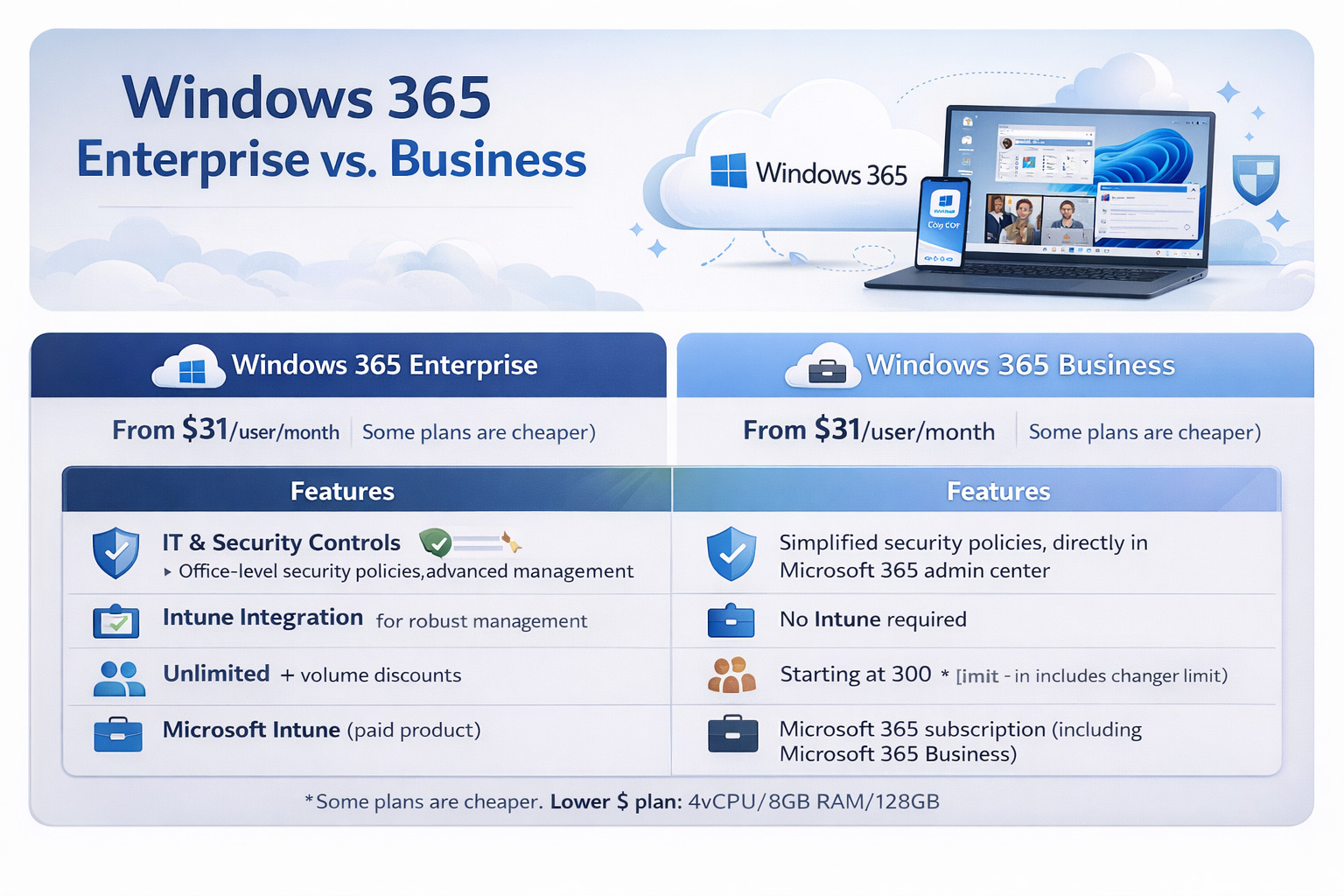
| Feature | Windows 365 Business | Windows 365 Enterprise |
|---|---|---|
| Target Audience | Small to medium-sized businesses (up to 300 users) | Large enterprises (over 300 users), complex IT environments |
| Management | Self-service, simple management via Microsoft 365 admin center | Comprehensive management via Microsoft Endpoint Manager (Intune) |
| Prerequisites | No additional licenses or Azure subscription required | Windows 10/11 Enterprise, Microsoft Endpoint Manager, Azure Subscription |
| Identity Management | Azure AD Join only (Cloud-only) | Azure AD Join or Hybrid Azure AD Join (supports on-prem AD) |
| Network Connectivity | Microsoft-managed network | Azure network connections (VNet peering, VPN to on-prem) |
| Custom Images | No (uses standard gallery images) | Yes (upload custom images for tailored deployments) |
| Security & Compliance | Basic security, Microsoft 365 security features | Advanced security, Defender for Endpoint integration, granular compliance |
| Scalability | Up to 300 Cloud PCs | Unlimited Cloud PCs, designed for large-scale enterprise deployments |
This comparison highlights that while both versions deliver the core Cloud PC experience, their underlying architectures and management models are distinct. Windows 365 Business prioritizes ease of use and rapid deployment for smaller entities, whereas Windows 365 Enterprise offers the depth of control, integration, and scalability required by large, complex organizations. Your choice will heavily depend on your existing IT landscape and future growth plans.
Choosing the Right Windows 365 Plan for Your Business
Selecting between Windows 365 Business and Enterprise is a critical decision that impacts your IT strategy, budget, and user experience. Consider these factors carefully:
- Company Size and Growth: If you're a small business under 300 users with no immediate plans for rapid expansion, Business is often the simpler and more cost-effective choice. Larger organizations or those anticipating significant growth will benefit from the scalability of Enterprise.
- IT Expertise and Resources: Do you have a dedicated IT team familiar with Microsoft Endpoint Manager, Azure AD, and networking? If so, Enterprise unlocks powerful management capabilities. If your IT resources are limited, the simplified management of Business is a strong advantage.
- Existing Microsoft Investments: If your organization already uses Microsoft 365 E3/E5 licenses, Azure AD, and Endpoint Manager, Windows 365 Enterprise will integrate seamlessly and leverage those existing investments. For businesses without these, Business avoids additional prerequisite costs.
- Security and Compliance Needs: Highly regulated industries or businesses with stringent security and compliance requirements will find the granular controls and advanced features of Enterprise indispensable. Business offers solid security, but Enterprise provides deeper customization.
- Application and Network Requirements: Do your users need to access on-premises resources via a VPN? Do you require custom application images for specific departments? Enterprise provides the network flexibility and image customization needed for these scenarios.
- Budget: While both are subscription-based, the total cost of ownership for Enterprise might be higher due to prerequisite licenses and the need for an Azure subscription. Evaluate the overall cost impact based on your existing licensing.
It's often helpful to conduct a pilot program with a small group of users to evaluate the experience and management overhead before a full-scale deployment. This hands-on experience can provide invaluable insights into which version best fits your specific operational workflows. Don't hesitate to consult with a Microsoft partner or licensing expert for personalized guidance.
Frequently Asked Questions About Windows 365
What kind of internet connection do I need for Windows 365?
A stable internet connection is essential. Microsoft recommends at least 10 Mbps for a smooth, productive experience, but higher bandwidth will naturally provide a better experience, especially when dealing with graphics-intensive applications or multiple monitors. The quality of your connection (latency, packet loss) is often more critical than raw bandwidth.
Can I install my own applications on a Windows 365 Cloud PC?
Yes, a Windows 365 Cloud PC functions like a regular Windows desktop. Users can install compatible applications just as they would on a physical PC, assuming they have the necessary administrative rights and licenses. For Enterprise, IT administrators can also pre-install applications on custom images for streamlined deployment.
Is Windows 365 suitable for power users or graphic designers?
Yes, Windows 365 offers various Cloud PC configurations, including options with more vCPUs, RAM, and even GPU acceleration for demanding workloads. While it might not replace specialized high-end workstations for every scenario, many power users and even some creative professionals can benefit from the high-performance Cloud PC options. It's crucial to select the right specification for the user's workload.
How does Windows 365 handle data storage and security?
All user data and applications reside securely in the Microsoft cloud, not on the local device. This significantly enhances security by preventing data loss if a physical device is lost or stolen. Microsoft implements robust physical and digital security measures, and both Business and Enterprise versions allow for further security policies to be applied by administrators, with Enterprise offering deeper integration with advanced security tools like Microsoft Defender.
Can I use my existing Windows licenses with Windows 365?
Yes, through the Windows Hybrid Benefit. If your users have an eligible Windows 10 or Windows 11 Pro license for their local device, you can receive a discount on your Windows 365 subscription. This helps optimize costs for organizations already invested in Microsoft's desktop operating system.
What devices can I access my Cloud PC from?
You can access your Windows 365 Cloud PC from virtually any modern device with an internet connection. This includes Windows PCs, Macs, iPhones, iPads, Android phones and tablets, and Linux devices. Access is primarily through a web browser or the Microsoft Remote Desktop client, offering broad compatibility and flexibility.
Conclusion: Empowering Your Workforce with the Right Cloud PC Solution
Windows 365 represents a significant leap forward in personal computing, delivering the full power and familiarity of Windows from the cloud. Whether your organization is a bustling startup or a sprawling enterprise, there's a Windows 365 edition designed to meet your specific needs. Windows 365 Business offers an approachable, streamlined solution for smaller teams seeking simplicity and quick deployment, while Windows 365 Enterprise provides the deep integration, robust management, and scalable infrastructure demanded by larger, more complex IT environments. By carefully evaluating your company's size, IT capabilities, security requirements, and growth trajectory, you can confidently choose the Cloud PC solution that not only enhances productivity and flexibility for your workforce but also simplifies IT management and strengthens your overall security posture. Embracing Windows 365 is more than just adopting a new technology; it's about investing in a future-ready, secure, and adaptable digital workspace for everyone.