ClickUp vs. Trello: Which is the best project management software?
In today's fast-paced work environment, effective project management isn't just an advantage—it's a necessity. Teams, whether large or small, distributed or co-located, need robust tools to keep tasks organized, communication clear, and goals aligned. The market is saturated with options, but two names consistently rise to the top of discussions for their distinct approaches: ClickUp and Trello. While both aim to streamline your workflows, they cater to different philosophies and team needs. One champions an "all-in-one" highly customizable platform, while the other prides itself on visual simplicity and ease of use. Deciding between them isn't about finding a universally "better" tool, but rather identifying which one perfectly aligns with your team's specific requirements, project complexity, and preferred way of working. This comprehensive guide will dissect the strengths and weaknesses of each, helping you make an informed decision for your next big project.
Understanding the Contenders: A Quick Overview
Before diving into the intricate details, let's establish a foundational understanding of what each platform offers at its core. Their underlying philosophies dictate their feature sets, user experience, and ideal use cases.
What is ClickUp? The All-in-One Powerhouse
ClickUp positions itself as "one app to replace them all." It's an incredibly robust and versatile project management platform designed to consolidate virtually every aspect of team collaboration and task management into a single interface. From basic task lists to complex project roadmaps, document creation, goal setting, and even real-time chat, ClickUp aims to be the central hub for your entire operation.
Its strength lies in its profound customizability and sheer breadth of features, catering to businesses of all sizes, from solopreneurs managing their personal tasks to large enterprises overseeing multiple departments and intricate projects. If you seek a tool that can adapt to almost any workflow imaginable and grow with your team's evolving needs, ClickUp presents a compelling, albeit sometimes overwhelming, option. It's for those who appreciate having a vast toolkit at their fingertips and are willing to invest time in setting it up to perfection.
What is Trello? The Visual Kanban Champion
Trello, on the other hand, embodies simplicity and visual clarity. Built around the Kanban methodology, Trello utilizes boards, lists, and cards to help users organize tasks in an intuitive, drag-and-drop interface. Imagine a digital whiteboard filled with sticky notes, each representing a task, and you have Trello.
Its primary appeal is its straightforwardness and ease of adoption. Teams can get up and running with Trello in minutes, making it ideal for those who prefer a less cluttered workspace and a focus on visual task flow. It's particularly popular among small teams, marketing departments, content creators, and individuals managing personal projects where an overly complex system might hinder rather than help. Trello excels at visualizing progress and providing a clear overview of who is working on what, and at what stage a task is in.
Feature Showdown: Depth vs. Simplicity
When comparing ClickUp and Trello, the most apparent difference emerges in their feature sets. ClickUp offers an expansive toolkit, while Trello maintains a minimalist approach, relying heavily on its core Kanban strengths and integrations to extend functionality.
Task Management & Organization
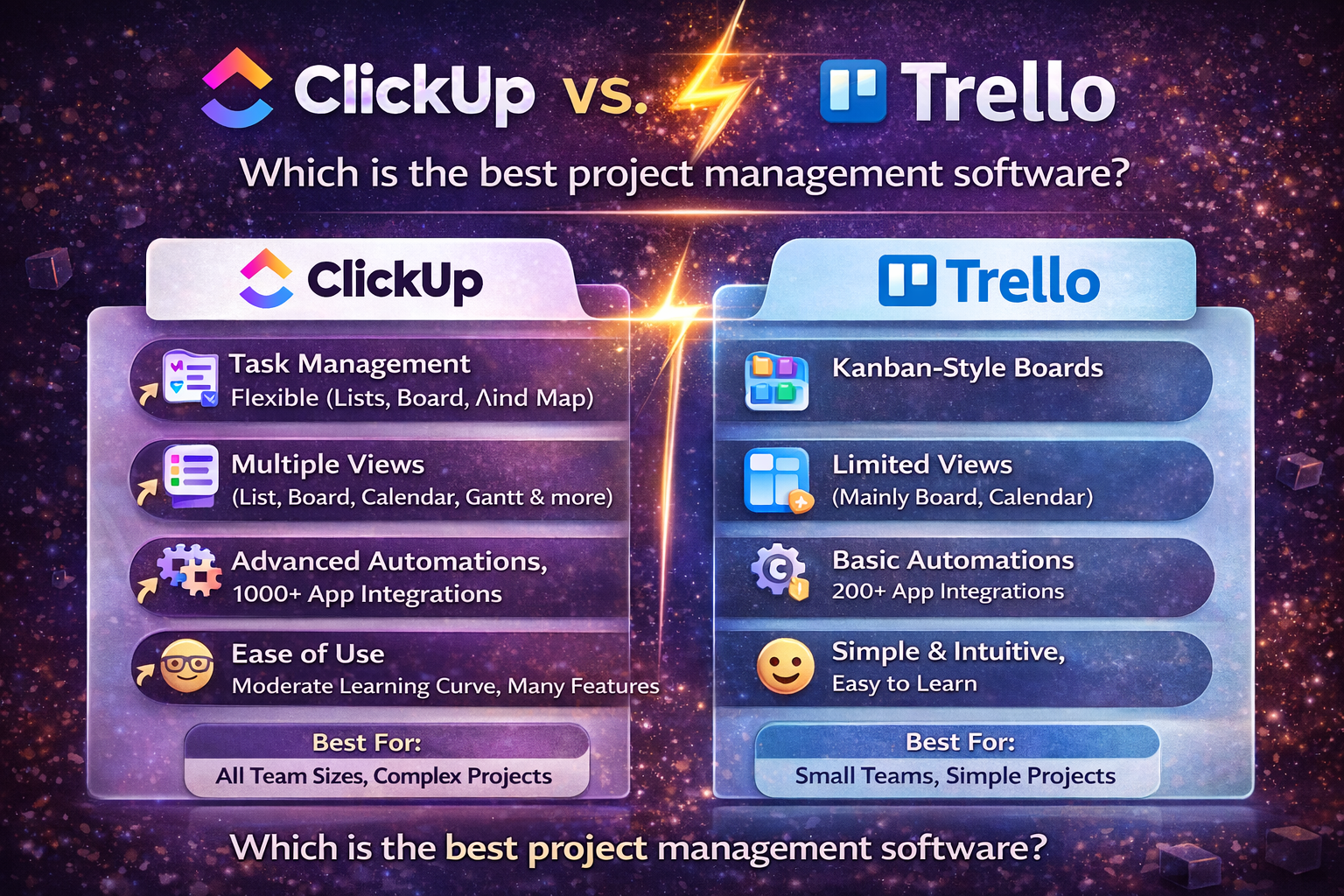
This is where the divergence truly begins. ClickUp boasts an incredibly flexible hierarchy: Spaces, Folders, Lists, Tasks, Subtasks, and even Checklists within subtasks. This allows for meticulous organization of large, complex projects and portfolios. Moreover, it offers over 15 different views to visualize your tasks, including List, Board (Kanban), Calendar, Gantt, Table, Mind Map, Workload, and even Whiteboards for brainstorming. Custom fields are incredibly powerful, letting you tailor task information precisely to your needs.
Trello, on the other hand, keeps it simple with Boards, Lists, and Cards. Each card can contain a description, checklists, due dates, attachments, and comments. Its strength is in visualizing stages of a workflow, such as "To Do," "Doing," and "Done." While less hierarchical, its drag-and-drop interface makes managing tasks exceptionally intuitive for straightforward projects. For teams needing advanced dependency tracking or complex resource allocation, Trello might feel limited without extensive Power-Ups.
Collaboration & Communication
Effective communication is paramount for any team. ClickUp integrates communication directly into its platform, offering an in-app chat function, assigned comments for direct action items, and robust document collaboration features like ClickUp Docs and Whiteboards. You can even proof images and PDFs directly within tasks, making feedback cycles efficient.
Trello relies primarily on comments within cards, allowing team members to discuss specific tasks. You can @mention colleagues to notify them, and add attachments for context. While it lacks built-in chat features, Trello integrates seamlessly with popular communication tools like Slack, ensuring teams can connect where they already are. Its simplicity ensures discussions stay focused on the card at hand.
Workflow Automation
Both platforms understand the value of automating repetitive tasks to save time and reduce errors. ClickUp offers powerful native automations, allowing users to set up triggers and actions (e.g., "when status changes to 'Done,' move task to 'Archive' and notify manager"). These automations are highly customizable and can integrate with various internal functions.
Trello features "Butler," its built-in automation tool. Butler allows you to create rules, button automations, and scheduled commands without writing a single line of code. For example, you can set a rule to automatically move cards to a "Done" list when their checklist is completed. While perhaps not as extensive as ClickUp's native automations, Butler is remarkably effective for Trello's specific workflow model and accessible to all users.
Reporting & Analytics
For teams needing deep insights into performance, ClickUp provides robust reporting capabilities. Its Dashboards are highly customizable, allowing you to track progress across projects, monitor team workload, analyze time spent, and gain comprehensive overviews of your operations. Features like Goals and Sprints also provide structured ways to measure outcomes.
Trello's native reporting is more limited, focusing primarily on visual progress on boards. While you can quickly see the status of tasks, it doesn't offer the in-depth analytics found in ClickUp. For advanced reporting, Trello users typically rely on Power-Ups, which can integrate with third-party analytics tools to provide more granular data. This means an additional layer of complexity and potentially cost.
Customization & Flexibility
ClickUp is arguably one of the most customizable project management tools available. Every element, from statuses and custom fields to views and permissions, can be tailored to fit your exact operational requirements. This unparalleled flexibility allows teams to create a highly personalized environment that mirrors their unique workflows perfectly. The learning curve is often a direct result of this extensive customization.
Trello offers customization within its Kanban framework. You can customize board backgrounds, card covers, and labels. Its true flexibility comes from Power-Ups, which are essentially integrations that add extra features directly to your boards. These can range from calendar views and voting systems to CRM functionalities. While Power-Ups greatly extend Trello's capabilities, they inherently add to the setup and management overhead, potentially moving away from Trello's core simplicity.
User Experience and Learning Curve
The best features in the world are useless if a team can't or won't use them. User experience and the associated learning curve are critical factors in adopting any new software.
Ease of Use
"For teams prioritizing immediate adoption and a minimalist interface, Trello is often the clear winner. However, for those willing to invest time in setup, ClickUp offers unmatched power and adaptability."
Trello shines in ease of use. Its interface is clean, intuitive, and highly visual. New users can grasp the basics of creating boards, lists, and cards within minutes. The drag-and-drop functionality is seamless, making task updates and workflow progression incredibly simple. This low barrier to entry makes it perfect for quickly onboarding new team members or for teams that prefer a less feature-heavy environment.
ClickUp, with its vast array of features and customization options, naturally has a steeper learning curve. New users might feel overwhelmed by the sheer number of settings, views, and functionalities available. However, ClickUp has made significant strides in improving its onboarding and user guides. Once a team invests the time to configure their workspace and understand its capabilities, ClickUp becomes an incredibly powerful and efficient tool. Its flexibility means that once mastered, it can be precisely tuned to specific workflows, ultimately enhancing productivity significantly.
Interface Design
Trello's interface is characterized by its clean, card-based design. Boards are visually appealing, and the focus on individual cards makes it easy to quickly scan and understand the status of tasks. It's an uncluttered experience that prioritizes readability and direct interaction.
ClickUp's interface is modern and sleek, but it can feel dense due to the multitude of options presented. While you can customize the layout to some extent, the sheer volume of information and features means there's a lot packed into each screen. Recent updates have focused on improving navigation and providing more guided experiences, but it remains a more information-rich environment than Trello.
Integrations and Ecosystem
No project management tool lives in a vacuum. Seamless integration with other business applications is crucial for an efficient workflow. Both ClickUp and Trello offer robust integration options, though their approaches differ.
Connecting Your Tools
ClickUp offers a wide array of native integrations with popular tools across various categories like communication (Slack, Microsoft Teams), development (GitHub, GitLab), file storage (Google Drive, Dropbox), and reporting. Its philosophy is to minimize context switching by bringing as much functionality as possible directly into ClickUp, reducing the need for external tools. For anything not natively integrated, ClickUp also supports connections via Zapier and has a well-documented open API for custom development.
Trello's approach to extending functionality heavily relies on its "Power-Ups." These are essentially mini-applications that integrate directly into your Trello boards. There's a Power-Up for almost everything, from calendar views and custom fields to integrations with CRM systems, reporting tools, and popular apps like Slack, Google Drive, and Evernote. While many Power-Ups are free, some advanced ones require a separate subscription or are exclusive to paid Trello plans. This modular approach allows users to only add the functionalities they need, maintaining Trello's core simplicity.
Pricing Models: Getting the Best Value
Cost is always a significant factor in software selection. Both ClickUp and Trello offer free tiers and multiple paid plans, each designed to cater to different team sizes and feature requirements.
ClickUp Pricing
ClickUp offers a generous Free Forever plan that includes unlimited tasks, members, and a fair amount of storage, along with basic access to most features like multiple views (List, Board, Calendar), email in ClickUp, and real-time chat. It's surprisingly robust for small teams or personal use.
- Unlimited: Designed for small teams, offering unlimited storage, integrations, Gantt charts, Goals, custom fields, and more.
- Business: Caters to mid-sized teams with advanced features like Google SSO, more automations, advanced public sharing, and additional reporting.
- Business Plus: Offers even more sophisticated features for larger businesses, including team-sharing, custom roles, and priority support.
- Enterprise: Tailored for very large organizations, providing dedicated success managers, advanced security, and comprehensive audit logs.
ClickUp's pricing structure scales with features and user count, making it a powerful investment for growing teams that need a comprehensive solution. The value proposition is high, especially for teams looking to consolidate multiple tools into one.
Trello Pricing
Trello also offers a very capable Free plan. This plan includes unlimited cards, up to 10 boards per workspace, unlimited storage, and basic Power-Ups. For personal use or very small teams with simple needs, the free tier is often sufficient.
- Standard: For small teams, offering unlimited boards, advanced checklists, custom fields, and up to 1,000 workspace command runs per month (Butler automations).
- Premium: Designed for teams needing more robust features, including various board views (Dashboard, Timeline, Table, Calendar, Map), unlimited workspace command runs, admin and security features, and priority support.
- Enterprise: For larger organizations, providing multi-board guests, organization-wide permissions, attachment restrictions, and robust security controls.
Trello's pricing is straightforward and generally more affordable at comparable tiers if your needs align with its Kanban-centric approach. It offers excellent value for teams prioritizing simplicity and visual workflow management without extensive advanced features.
ClickUp vs. Trello: A Direct Comparison
To summarize the key differences and help you visualize where each platform excels, here's a direct comparison of their core aspects.
| Feature | ClickUp | Trello |
|---|---|---|
| Core Philosophy | All-in-one productivity platform, highly customizable, consolidates tools. | Visual Kanban board for simple task management and collaboration. |
| Task Organization | Hierarchical (Spaces, Folders, Lists, Tasks, Subtasks), custom fields. | Boards, Lists, Cards; simple, flat structure. |
| Views Available | 15+ views (List, Board, Calendar, Gantt, Table, Mind Map, Workload, etc.). | Primary Board view; Timeline, Table, Calendar, Map views available in Premium plans. |
| Collaboration | In-app chat, assigned comments, Docs, Whiteboards, proofing. | Card comments, @mentions, robust integrations with communication tools. |
| Automation | Native, highly customizable automations (triggers & actions). | Butler (built-in automation rules, buttons, scheduled commands). |
| Reporting & Analytics | Robust custom Dashboards, Goals, Sprints, time tracking reports. | Basic progress visualization; relies on Power-Ups for advanced analytics. |
| Customization | Extremely high: custom statuses, fields, views, permissions, templates. | Moderate: board backgrounds, card covers, labels; extended by Power-Ups. |
| Learning Curve | Steeper due to extensive features and configuration options. | Very low, highly intuitive, quick to get started. |
| Integrations | Hundreds of native integrations, Zapier, open API. | Extensive Power-Ups for specific functionalities and external apps. |
| Ideal User | Growing teams, complex projects, seeking consolidation & deep customization. | Small teams, visual thinkers, simple workflows, quick adoption. |
Who Should Choose ClickUp?
ClickUp is a formidable tool for teams that:
- Manage complex projects with multiple dependencies, sub-tasks, and stakeholders.
- Need deep customization to fit unique departmental or organizational workflows.
- Are looking to consolidate multiple tools (task management, documents, chat, goals, time tracking) into a single platform.
- Require advanced reporting and analytics to track performance, allocate resources, and measure progress against strategic goals.
- Have a dedicated project manager or team who can invest time in initial setup and ongoing optimization.
- Are scaling rapidly and need a tool that can evolve with their increasing complexity and demands.
Who Should Choose Trello?
Trello is an excellent choice for teams that:
- Prefer a simple, visual, and intuitive way to manage tasks, especially using the Kanban method.
- Are small to medium-sized and have relatively straightforward project workflows.
- Value quick adoption and minimal learning curve, wanting to get started immediately.
- Focus heavily on visualizing task progression through clear stages (e.g., "To Do," "In Progress," "Done").
- Don't require extensive reporting, complex hierarchies, or a broad suite of integrated productivity features.
- Are content with extending functionality through a curated selection of Power-Ups rather than native, all-encompassing features.
Frequently Asked Questions (FAQ)
Is ClickUp better than Trello for large teams?
For large teams with complex projects, multiple departments, and a need for extensive customization and reporting, ClickUp is generally considered superior. Its hierarchical structure, advanced features, diverse views (Gantt, Workload), and robust reporting capabilities are better suited for managing scale and intricate workflows. Trello can become cumbersome for large teams without significant reliance on Power-Ups, which can add complexity.
Can Trello handle project dependencies like Gantt charts?
Natively, Trello does not offer Gantt charts or built-in dependency tracking. Its core strength is visualizing tasks on a Kanban board. However, Trello users can add Gantt chart functionality and basic dependency tracking through various Power-Ups (integrations) available in its marketplace. ClickUp, conversely, offers native Gantt charts as a standard view within its platform, making it a more direct solution for dependency management.
Which tool offers better free plans?
Both ClickUp and Trello offer very generous free plans. ClickUp's Free Forever plan includes unlimited users and tasks, along with access to many core features like List, Board, and Calendar views, making it incredibly powerful for individuals and small teams needing more versatility. Trello's Free plan offers unlimited cards, up to 10 boards per workspace, and basic Power-Ups, which is excellent for personal use or small teams focused purely on Kanban task management. The "better" free plan depends on whether you prioritize a broader feature set (ClickUp) or pure simplicity (Trello).
Is it difficult to migrate from Trello to ClickUp?
Migrating from Trello to ClickUp is a common path for growing teams. ClickUp offers a direct import tool specifically for Trello boards, making the process relatively straightforward. This tool typically allows you to bring over your boards as lists, cards as tasks, and retain members, attachments, and comments. While the structural differences mean some manual adjustment might be needed to optimize the imported data for ClickUp's hierarchy, the initial import is designed to be user-friendly.
Which software is better for agile teams?
Both tools can support agile methodologies, but they cater to different aspects. Trello's Kanban boards are inherently agile-friendly, making it excellent for visualizing sprints, backlogs, and work in progress. For teams practicing Scrum or other more structured agile frameworks, ClickUp offers native features like Sprints, Burndown Charts, and custom agile dashboards, providing a more comprehensive agile management suite out-of-the-box. The choice depends on the specific flavor and complexity of your agile implementation.
Do both tools offer time tracking?
ClickUp offers native time tracking directly within tasks, allowing users to start and stop timers, log time manually, and view time reports. This is a significant built-in advantage for teams needing to track billable hours or project duration. Trello does not have native time tracking. To add this functionality to Trello, you would need to use a Power-Up that integrates with a third-party time tracking application.
Conclusion: The Right Tool for Your Team
The debate between ClickUp and Trello isn't about identifying a single "winner," but rather finding the perfect fit for your specific team and project needs. Both are excellent project management software solutions, yet they cater to fundamentally different philosophies of work.
Choose ClickUp if: You're a growing team or an enterprise dealing with complex projects, requiring extensive customization, a wide array of features (Gantt, Docs, time tracking, advanced reporting), and the ability to consolidate multiple tools into a single, powerful platform. You're willing to invest time in setup to achieve unparalleled flexibility and depth.
Choose Trello if: Your team thrives on visual simplicity, uses the Kanban methodology for straightforward workflows, values ease of use and quick adoption above all else, and doesn't require a deep feature set or intricate reporting. It's perfect for smaller teams, marketing campaigns, or editorial calendars where clarity and immediate understanding are key.
Ultimately, the best way to make your decision is to leverage their generous free plans. Experiment with both platforms, even on a small project, to see which interface resonates more with your team and which feature set truly addresses your operational pain points. Your ideal project management software is the one that empowers your team to work smarter, not harder, fostering collaboration and driving successful outcomes. Consider your team's size, project complexity, budget, and desired level of customization, and you'll be well on your way to selecting the optimal tool.