LinkedIn Premium Career vs. Sales Navigator: A Comprehensive Guide
In today's professional landscape, LinkedIn stands as an undisputed titan for networking, career advancement, and business development. While a free LinkedIn profile offers considerable utility, its premium subscriptions unlock a new realm of powerful features designed to accelerate specific professional goals. But with options like LinkedIn Premium Career and Sales Navigator, how do you know which one truly aligns with your ambitions? This guide aims to demystify these two robust offerings, providing a detailed comparison to help you make an informed decision. Whether you're a job seeker eager to land your dream role or a sales professional striving to exceed targets, understanding the nuanced differences and unique benefits of each plan is crucial for maximizing your investment and achieving your desired outcomes.
Understanding LinkedIn's Premium Ecosystem
LinkedIn's core mission revolves around connecting the world's professionals to make them more productive and successful. To serve a diverse user base with varying needs, LinkedIn offers several premium tiers, each meticulously crafted for distinct objectives. Beyond the free experience, these paid subscriptions offer enhanced visibility, deeper insights, and more direct communication avenues.
The fundamental idea behind any LinkedIn Premium subscription is to give you an edge. This might involve seeing who's viewed your profile, gaining access to more comprehensive analytics, or sending InMail messages to connect with individuals outside your immediate network. Understanding the overarching benefits of premium membership is the first step before diving into the specifics of Career versus Sales Navigator.
LinkedIn Premium plans are designed not just to open doors, but to give you the keys to navigate through them more efficiently, whether you're climbing the career ladder or building a formidable sales pipeline.
Deep Dive into LinkedIn Premium Career: Your Path to Professional Growth
LinkedIn Premium Career is specifically engineered for individuals focused on career advancement, job searching, and professional skill development. If your primary goal is to secure a new role, enhance your professional brand, or acquire new competencies, this premium tier is designed with your aspirations in mind. It provides tools that give job seekers and career builders a distinct advantage in a competitive market.
Key Features of Premium Career:
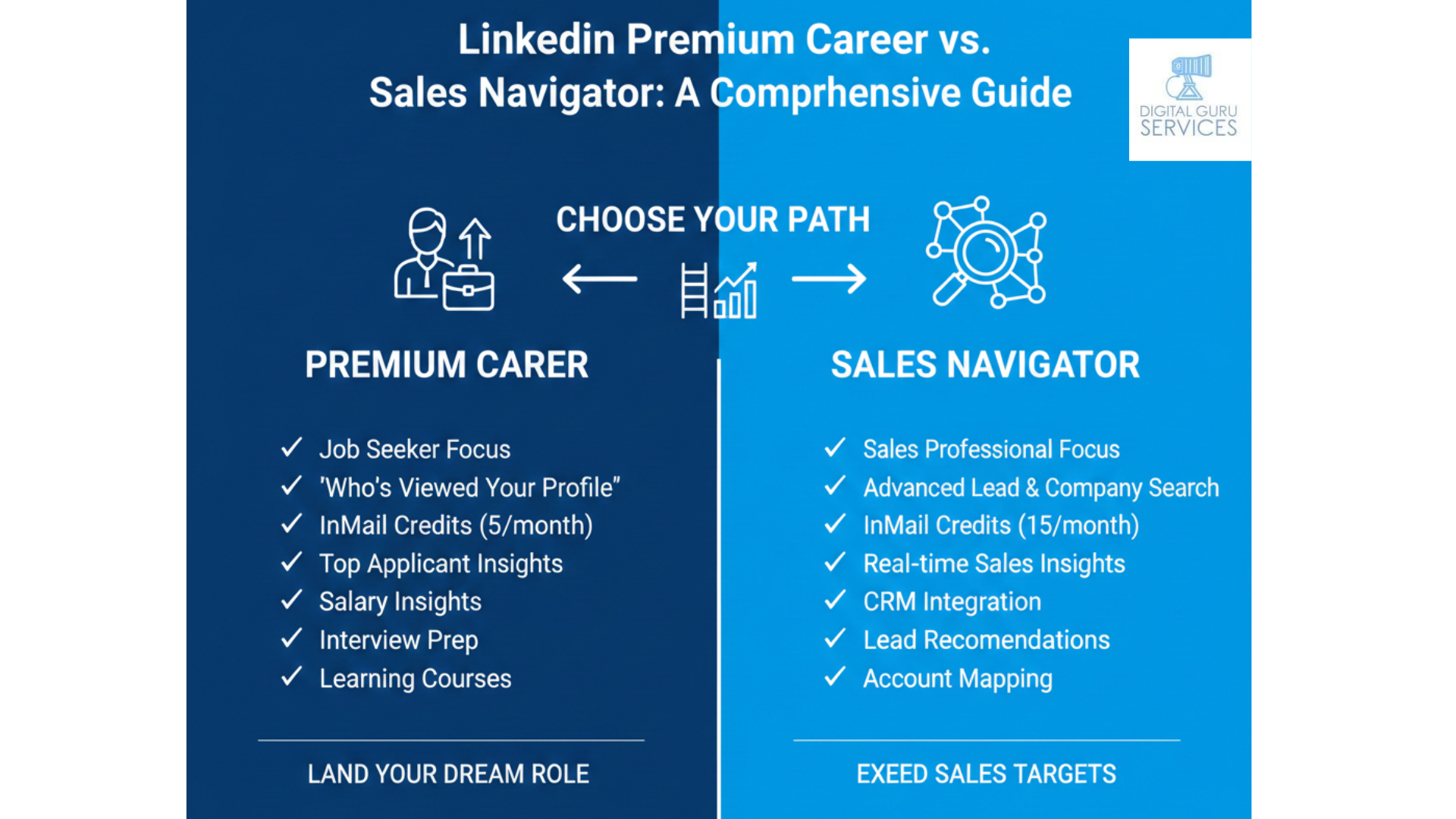
- Applicant Insights: Gain a significant edge by seeing how you compare to other job applicants. This feature provides data on your skills, education, and experience relative to others who've applied for the same position, allowing you to tailor your applications more effectively.
- Featured Applicant: Increase your visibility to hiring managers. Your application will be highlighted, potentially making it stand out in a crowded field of candidates and drawing more attention to your profile.
- InMail Credits: Send direct messages to people outside your network, including recruiters and hiring managers. Premium Career typically offers 5 InMail credits per month, allowing for targeted outreach that can bypass traditional application channels.
- LinkedIn Learning Access: Unlock thousands of expert-led courses to develop new skills or refine existing ones. This is invaluable for career growth, staying competitive, and demonstrating a commitment to continuous learning. You can explore relevant courses on topics like project management or digital marketing skills.
- "Who's Viewed Your Profile" (All-Time): See everyone who has viewed your profile over the past 90 days, providing valuable insights into potential connections or interested employers. This full access removes the limitations of the free version.
- Interview Prep: Access tools and resources to practice common interview questions, get feedback, and build confidence before crucial interviews. This can significantly improve your chances of success.
- Open to Work Features: Enhance your "Open to Work" status with more visibility options and specific preferences, making it easier for recruiters to find you for relevant opportunities.
Who is Premium Career Best Suited For?
- Active Job Seekers: Those who are actively applying for jobs and want every possible advantage to stand out and connect with decision-makers.
- Career Changers: Individuals looking to transition into a new industry or role, who can benefit from LinkedIn Learning and targeted networking.
- Professionals Seeking Advancement: People aiming for promotions or looking to build new skills to take their current career to the next level.
- Networking Enthusiasts: Those who want to expand their professional network strategically and reach out to industry leaders.
In essence, Premium Career is your personal career coach and job search assistant rolled into one. It empowers you with insights and tools that can significantly shorten your job search or accelerate your professional development journey.
Deep Dive into LinkedIn Sales Navigator: Powering Your Sales Pipeline
LinkedIn Sales Navigator is a robust sales intelligence platform designed for sales professionals, business development teams, and marketers involved in account-based marketing. Its primary purpose is to help users find the right leads, understand their prospects, and engage them effectively, ultimately driving more sales. This tool transforms LinkedIn into a powerful engine for lead generation and relationship building.
Key Features of Sales Navigator:
- Advanced Lead & Account Search: This is arguably its most powerful feature. Sales Navigator offers incredibly granular search filters—far beyond standard LinkedIn search—to pinpoint ideal leads and accounts. You can filter by industry, company size, seniority, department, years in current role, interests, and much more.
- Real-time Sales Insights: Get alerts on job changes, company news, and relevant professional updates for your saved leads and accounts. This contextual information enables timely and personalized outreach.
- Custom Lead & Account Lists: Organize your prospects and target companies into custom lists, making it easy to manage your pipeline and track interactions. This acts as a mini-CRM within LinkedIn.
- Expanded InMail Credits: Sales Navigator provides a significantly higher number of InMail credits (typically 20-50 per month, depending on the plan) compared to Premium Career, crucial for consistent outreach to decision-makers.
- CRM Integrations: Seamlessly integrate with popular CRM systems like Salesforce, allowing for synchronization of data and improved workflow efficiency for sales teams.
- Smart Links: Share content (presentations, documents) with prospects and track engagement, providing valuable insights into what resonates with them.
- TeamLink: Leverage your team's collective network to find warmer introductions to prospects. This feature identifies if a colleague is connected to your target, facilitating easier access.
Who is Sales Navigator Best Suited For?
- Sales Professionals: Individuals whose core role involves prospecting, lead generation, and closing deals.
- Business Development Managers: Those responsible for identifying new opportunities, partnerships, and market expansion.
- Account Managers: Professionals focused on growing existing accounts and identifying cross-selling or upselling opportunities.
- Entrepreneurs and Small Business Owners: Individuals in B2B spaces looking to build their client base and scale their business through targeted outreach.
Sales Navigator isn't just a fancy search tool; it's a strategic platform that empowers sales professionals to find, understand, and engage with their ideal customers more effectively than ever before. For a deeper dive into lead generation strategies, consider exploring effective lead generation strategies.
Key Differences & Feature Comparison
While both Premium Career and Sales Navigator offer enhanced LinkedIn experiences, their underlying objectives and feature sets diverge significantly. The fundamental distinction lies in their primary user base and the specific problems they aim to solve. One is geared towards personal career trajectory, while the other is an enterprise-grade tool for revenue generation.
Purpose and Target Audience:
- Premium Career: Focused on individual career growth, job searching, and skill development. It helps you get hired and stay competitive.
- Sales Navigator: Geared towards sales teams and individuals whose primary responsibility is finding, connecting with, and selling to prospects and accounts. It helps you hit sales quotas.
Feature Breakdown Comparison Table:
| Feature | LinkedIn Premium Career | LinkedIn Sales Navigator |
|---|---|---|
| Primary Goal | Job search, career advancement, skill development | Lead generation, prospecting, pipeline building, sales intelligence |
| InMail Credits | Typically 5 per month | Typically 20-50 per month (depending on plan) |
| Advanced Search Filters | Basic job and people search filters | Extremely granular lead & account search (e.g., seniority, department, company growth) |
| "Who's Viewed Your Profile" | Full 90-day history | Full 90-day history (but less emphasis on this for sales) |
| LinkedIn Learning | Full access to entire library | Limited access, usually to sales-related courses |
| Sales Alerts/Insights | No specific sales alerts | Real-time alerts on leads/accounts (job changes, company news) |
| CRM Integration | Not a feature | Robust integration with leading CRMs (e.g., Salesforce) |
| Team Collaboration Tools | No specific team tools | TeamLink, shared lists, team reporting (for advanced plans) |
| Job Application Tools | Applicant Insights, Featured Applicant, Interview Prep | No job application specific tools |
The table clearly illustrates that while both leverage the LinkedIn platform, they are optimized for vastly different use cases. Choosing between them is less about which is "better" and more about which is "right" for your specific professional objectives.
Who Should Choose Which? Making the Right Decision
Now that we've thoroughly explored the features of both LinkedIn Premium Career and Sales Navigator, it's time to consolidate that knowledge into actionable advice. Your choice should be a direct reflection of your current professional needs and long-term aspirations.
Opt for LinkedIn Premium Career if you are:
- An active job seeker who wants to stand out, understand application competition, and prepare effectively for interviews.
- Focused on upskilling or reskilling through LinkedIn Learning to enhance your resume or transition careers.
- Looking to strategically network for career advancement, rather than sales or business development.
- Someone who wants to know who is viewing your profile to gauge interest from recruiters or potential collaborators.
- Primarily concerned with your personal professional brand and development within your existing or new career path.
Choose LinkedIn Sales Navigator if you are:
- A sales professional or business development representative tasked with finding new leads and closing deals.
- Working in a B2B sales environment where precise targeting of companies and decision-makers is crucial.
- Looking for advanced search capabilities to segment and filter prospects with incredible detail.
- Needing real-time insights and alerts about your target accounts and leads to personalize outreach.
- Part of a sales team that could benefit from CRM integrations and collaborative tools like TeamLink.
- Engaged in account-based marketing (ABM) and need to identify and engage key stakeholders within target organizations.
Consider your daily tasks, your core professional goals for the next 6-12 months, and the specific metrics by which your success is measured. This self-assessment will be your most reliable guide.
Maximizing Your Investment: Tips for Success
Simply subscribing to a premium plan isn't enough; active engagement and strategic utilization of its features are key to seeing a return on your investment. Here are some tips to help you get the most out of your chosen LinkedIn premium subscription.
For Premium Career Users:
- Update Your Profile Diligently: Ensure your profile is fully optimized with relevant keywords, skills, and a compelling summary. Recruiters use these to find candidates.
- Utilize InMail Wisely: Craft personalized messages that clearly state your purpose and value. Don't spam; target your outreach thoughtfully.
- Engage with LinkedIn Learning: Set aside dedicated time each week to complete courses relevant to your career goals. Add completed certifications to your profile.
- Analyze Applicant Insights: Use this data to identify gaps in your skills or experience and address them in your resume or cover letter.
- Network Actively: Don't just apply for jobs; connect with people in your target companies and industries. Use "Who's Viewed Your Profile" as a networking opportunity.
For Sales Navigator Users:
- Master Advanced Search: Spend time experimenting with filters to build highly specific lead and account lists. The more precise your search, the better your results.
- Leverage Real-time Insights: Use alerts for trigger events (e.g., new job, company funding) to initiate timely and relevant conversations.
- Personalize Every Outreach: Never send generic InMails. Reference a specific piece of news, a shared connection, or a recent company update.
- Integrate with Your CRM: Ensure your Sales Navigator activity syncs with your CRM to maintain a single source of truth for all prospect interactions.
- Build and Manage Lead Lists: Organize your prospects by industry, stage in the sales cycle, or any other relevant criteria to streamline your outreach efforts.
- Utilize TeamLink: If available, check for team connections to secure warm introductions, significantly increasing your chances of engagement.
Remember, these are tools designed to augment your efforts, not replace them. Your strategic thinking, persistence, and genuine human connection remain paramount for success.
Frequently Asked Questions (FAQ)
1. Can I have both LinkedIn Premium Career and Sales Navigator simultaneously?
While technically possible, it's generally not recommended or necessary due to overlapping costs and distinct feature sets. Most users find that one platform sufficiently addresses their primary professional goals. If your roles require both intense job searching and extensive sales prospecting, consider which need is more urgent and choose accordingly, or alternate subscriptions if feasible.
2. Is LinkedIn Premium Career truly worth the investment for job seekers?
For serious job seekers, especially those in competitive fields or higher-level roles, Premium Career can be a significant asset. Features like Applicant Insights, Featured Applicant, and LinkedIn Learning can provide a crucial edge in standing out and enhancing your qualifications. It can potentially shorten your job search, making the monthly cost worthwhile.
3. How many InMails do I receive with each plan?
LinkedIn Premium Career typically provides 5 InMail credits per month. Sales Navigator offers a much higher volume, generally ranging from 20 to 50 InMail credits per month, depending on the specific Sales Navigator plan (Core, Advanced, etc.). This difference reflects their distinct purposes: targeted personal outreach versus high-volume sales prospecting.
4. Does Sales Navigator replace a traditional CRM system?
No, Sales Navigator is not designed to replace a full-fledged CRM (Customer Relationship Management) system. While it offers some CRM-like functionalities for lead and account management, its primary role is as a sales intelligence and prospecting tool. It excels at finding and understanding prospects; a CRM is crucial for managing the entire customer lifecycle, including post-sale support and long-term relationship tracking. However, its robust integration capabilities enhance many popular CRM platforms.
5. Can recruiters use Sales Navigator for hiring?
While recruiters might find some advanced search filters useful, Sales Navigator is explicitly designed for sales professionals. LinkedIn offers a separate product, LinkedIn Recruiter (and Recruiter Lite), which is tailored specifically for talent acquisition, offering robust candidate search, applicant tracking, and recruiter-specific InMail quotas. Recruiters would find far greater value in Recruiter Lite or Corporate Recruiter. You can learn more about LinkedIn Recruiter Lite's features on our blog.
6. What is the approximate cost of these premium plans?
Pricing for LinkedIn Premium plans can vary based on region, promotions, and whether you choose monthly or annual billing. As of late 2023/early 2024, Premium Career generally costs around $30-$40 USD per month. Sales Navigator is significantly more expensive, with plans starting around $80-$100 USD per month for individuals and custom pricing for teams. It's always best to check the official LinkedIn Premium page for the most current and accurate pricing.
7. How long should I subscribe to a premium plan?
The duration depends on your goals. For job seekers, a 3-6 month subscription to Premium Career might be sufficient to secure a new role. Sales professionals using Sales Navigator often maintain their subscription continuously as it's an ongoing tool for their daily work. Consider using the free trial period (if available) to gauge its effectiveness for your specific needs before committing to a longer subscription.
Conclusion: Choose Your Accelerator Wisely
Deciding between LinkedIn Premium Career and Sales Navigator boils down to a clear understanding of your professional objectives. Are you primarily focused on landing your next big job, developing new skills, and elevating your personal brand? Then Premium Career is your ideal companion. Are you a sales professional, business developer, or marketer whose success hinges on identifying, engaging, and converting prospects into clients? In that case, Sales Navigator is the powerful engine you need to supercharge your pipeline.
Both tools offer significant advantages over the free LinkedIn experience, but they are purpose-built for different missions. By carefully evaluating your needs against the detailed features outlined in this guide, you can confidently select the LinkedIn premium subscription that will serve as the most effective accelerator for your unique professional journey. Make your choice wisely, and leverage the full potential of LinkedIn to achieve your goals.